Learn how to generate the Fibonacci series in Java up to N terms with step-by-step code explanation for beginners. Understand logic, loops, and variables clearly.
Article Body
Mastering Fibonacci Series Generation in Java with Easy Code and Explanation
📝 Article: Generate Fibonacci Series up to N Terms in Java – Full Guide with Code
The Fibonacci series is one of the most common and interesting number patterns in programming. It's often used in coding interviews, recursion practice, and math-related projects. In this blog post, we’ll learn how to generate the Fibonacci series up to N terms in Java, and we’ll explain each line of code in the simplest way possible.
🔢 What is the Fibonacci Series?
The Fibonacci series is a sequence of numbers where:
Each number is the sum of the two numbers before it.
It starts from:
0, 1, 1, 2, 3, 5, 8, 13, 21, 34, ...
First term: 0
Second term: 1
Third term: 0 + 1 = 1
Fourth term: 1 + 1 = 2
Fifth term: 1 + 2 = 3
And so on...
✅ Java Code to Generate Fibonacci Series up to N Terms
import java.util.Scanner;

public class FibonacciSeries {
    public static void main(String[] args) {
        // Create Scanner object to take input from user
        Scanner scanner = new Scanner(System.in);

        // Ask the user for the number of terms
        System.out.print("Enter the number of terms (N): ");
        int n = scanner.nextInt();

        // Check if N is valid
        if (n <= 0) {
            System.out.println("Please enter a positive number greater than 0.");
        } else {
            System.out.println("Fibonacci Series up to " + n + " terms:");

            // Initialize first two terms
            int first = 0, second = 1;

            for (int i = 1; i <= n; i++) {
                System.out.print(first + " ");

                // Calculate the next term
                int next = first + second;

                // Update first and second terms
                first = second;
                second = next;
            }
        }

        scanner.close();
    }
}
🧠 Step-by-Step Explanation
Let’s break it down so even if you're new to Java, you’ll understand it easily.
1️⃣ import java.util.Scanner;
This line imports the Scanner class which helps us take input from the user (in this case, the number of terms N).
2️⃣ public class FibonacciSeries { ... }
This defines our class named FibonacciSeries. In Java, every application must have a class.
3️⃣ public static void main(String[] args) { ... }
This is the main method. Java starts running the program from here.
4️⃣ Scanner scanner = new Scanner(System.in);
Creates a Scanner object to read user input from the keyboard.
5️⃣ System.out.print("Enter the number of terms (N): ");
Asks the user to enter how many terms of the Fibonacci series they want.
6️⃣ int n = scanner.nextInt();
Reads the integer entered by the user and stores it in variable n.
7️⃣ if (n <= 0) { ... } else { ... }
Checks if the user entered a valid number. Fibonacci needs at least one term.
8️⃣ int first = 0, second = 1;
Initializes the first two terms of the series: 0 and 1.
9️⃣ for (int i = 1; i <= n; i++) { ... }
A loop that runs n times to print the series.
10️⃣ System.out.print(first + " ");
Prints the current number.
11️⃣ int next = first + second;
Calculates the next number in the series.
12️⃣ first = second; second = next;
Updates values to move forward in the series.
13️⃣ scanner.close();
Closes the scanner to avoid memory leaks.
💡 Example Output
If the user enters 7, the output will be:
Enter the number of terms (N): 7
Fibonacci Series up to 7 terms:
0 1 1 2 3 5 8
🚀 Why Learn Fibonacci in Java?
Great for interviews – It’s a common question!
Improves logic – Understands how loops and variables work.
Perfect for beginners – A simple but powerful concept.
🛠️ Bonus Tips
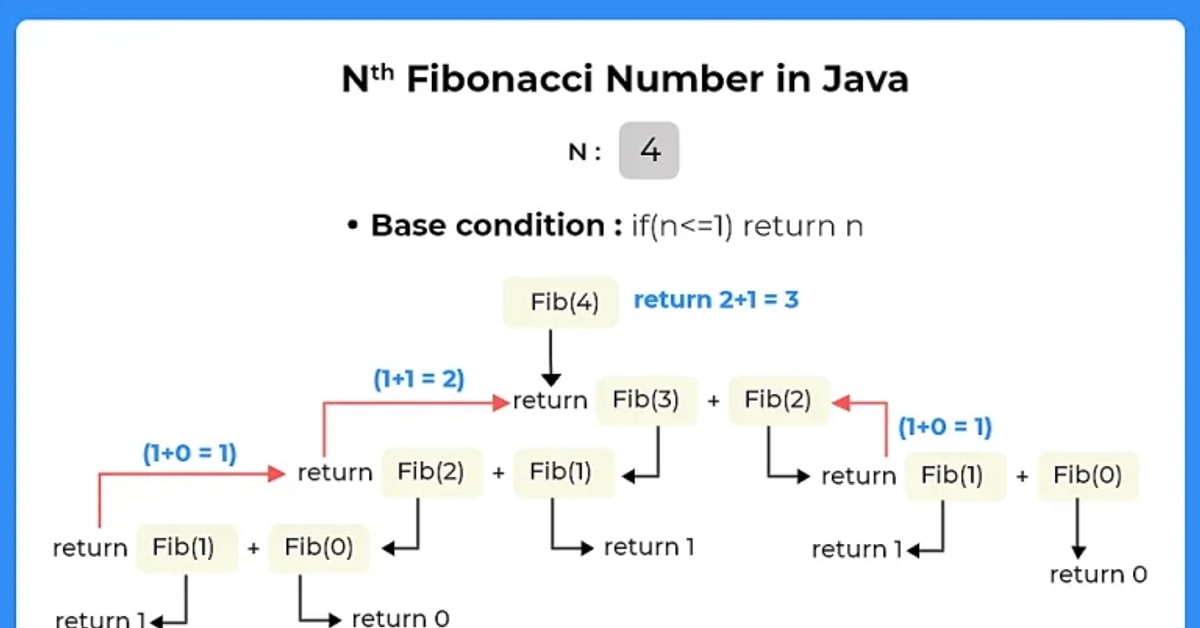
Want to try this with recursion? You can also write a function that calls itself.
Want to store the series? Use an Array or ArrayList.
Want to print only even Fibonacci numbers? Add a condition inside the loop.
📌 Final Thoughts
Generating the Fibonacci series in Java is a great way to practice loops, logic, and input handling. With the above explanation and code, you should now be able to write your own program and understand each step of it clearly.
Practice with different values of N, and try modifying the code to improve your skills.
Rahul is a software engineer and editor at Galaxy Founder, passionate about technology, startups, and digital innovation. With a keen eye for emerging trends and a love for clean, efficient code, Rahul shares insights and resources to help others navigate the evolving tech landscape.


Comments